This guide explains how subscriptions work on Jemmo, including plans, free trials, and billing management.
What you'll learn
- Choose the right plan for your needs
- Understand the 14-day free trial
- Manage seats for your team
- Handle billing and invoices
Available Plans
Jemmo offers three subscription plans:
| Plan | Price | Included Seats | Best For |
|---|---|---|---|
| Starter | €25/month | 1 seat | Solo recruiters or small teams |
| Pro | €900/month — billed annually (€10,800/yr ex. VAT) | 5 seats | Teams who want to automate and collaborate |
| Enterprise | Custom quote | +10 seats | Large recruitment teams with advanced needs |
All plans include full access to AI matching, talent search, and integrations. The Pro plan additionally includes the ATS/CRM connection and the Public 25M and Freelance 300K bases.
Free Trial
14-Day Free Trial
When you first subscribe, you get a 14-day free trial. No charges are applied until the trial ends.
- Full access to all features during the trial
- Cancel anytime before the trial ends at no cost
- Automatic billing starts only after the trial period
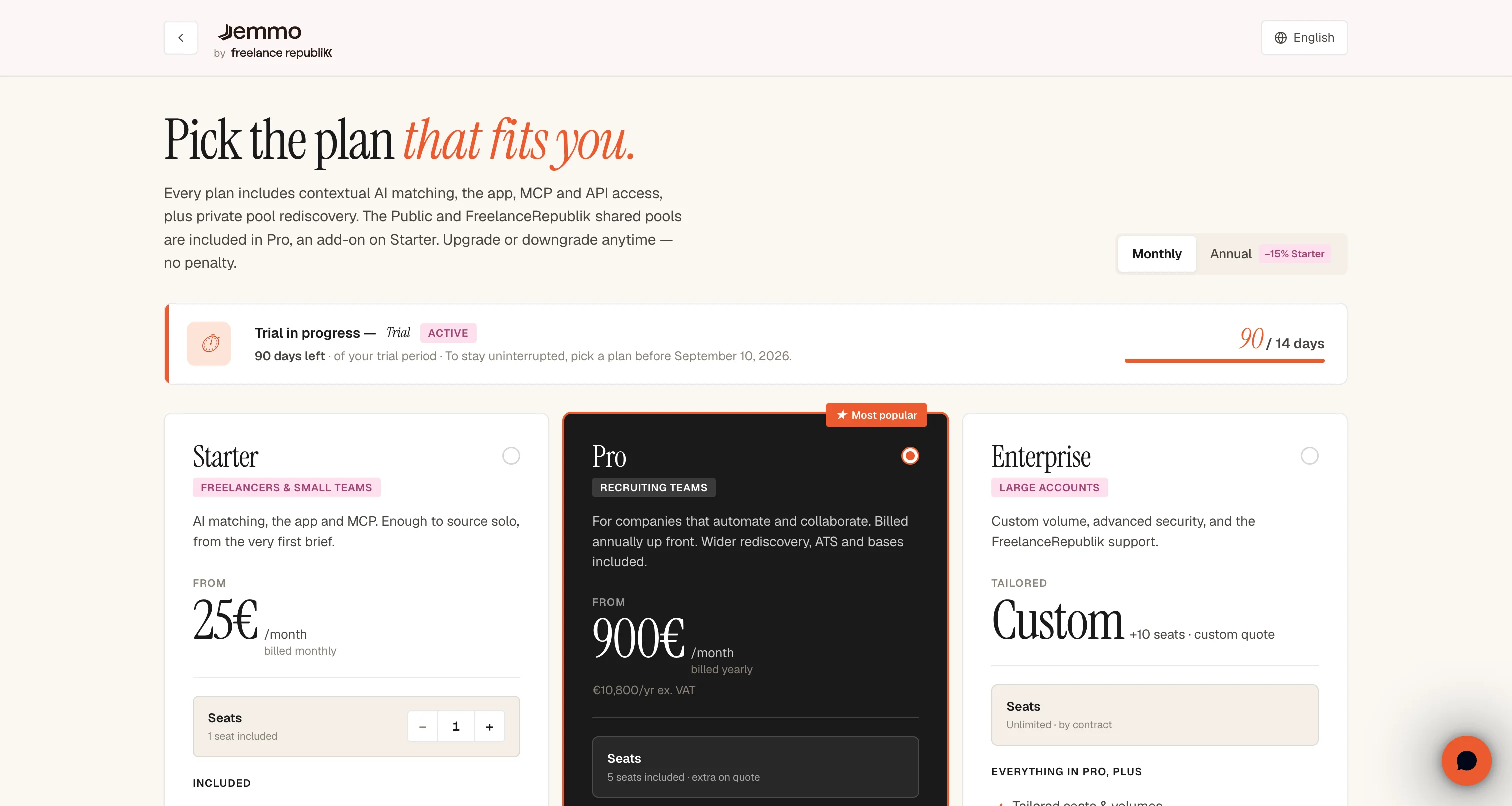
Subscribing
During Onboarding
After creating your account, you'll be prompted to choose a plan:
- Select your preferred plan (Starter, Pro, or Enterprise)
- Adjust the number of seats if needed
- Click Start free trial to proceed to checkout
- Complete payment via Stripe
Changing Your Plan
You can upgrade or change your plan anytime from Settings → Subscription:
Managing Seats
What are Seats?
A seat represents a team member with access to your organization on Jemmo. Each plan includes a base number of seats:
- Starter: 1 seat included
- Pro: 5 seats included
- Enterprise: +10 seats included
Adding Extra Seats
You can add extra seats beyond the included amount:
- On Starter, extra seats are €25 per seat per month; on Pro and Enterprise, additional seats are on quote
- Adjust the seat count when subscribing or changing plans
- Use the +/- buttons to add or remove seats
Billing Management
Accessing the Billing Portal
Manage your payment methods and invoices via the Stripe Customer Portal:
- Go to Settings → Organization
- Click Manage subscription in the Billing section
- You'll be redirected to Stripe's secure portal
What You Can Do
In the billing portal, you can:
- Update payment methods
- Download invoices
- Cancel or pause your subscription
- Update billing information
Subscription Status
Status Indicators
| Status | Meaning |
|---|---|
| Active | Subscription is active and paid |
| Trial | 14-day free trial in progress |
| Past Due | Payment failed — update payment method |
| Canceled | Subscription ended, access restricted |
When Trial Expires
If your trial expires without a payment method on file:
- Access to AI matching is restricted
- You can still view your existing data
- Subscribe to regain full access
Faq
Can I cancel during the trial?
Yes. Cancel anytime during the 14-day trial at no cost. You won't be charged.
How do I add team members?
Invite members from Settings → Members. They'll use one of your available seats.
What happens if payment fails?
You'll receive an email notification. Update your payment method in the billing portal to restore access.
Can I downgrade my plan?
Yes, you can change plans anytime. Changes take effect at the end of your current billing period.
Need help? Use the chat bubble in the bottom right corner or contact support@jemmo.io